Skip to primary content
Skip to secondary content

Ovais TechBlogs

Technical articles on Azure, Open-Source technologies and Software Architectures

Ovais TechBlogs

Main menu

  • Home
  • About Me
  • Publishing

Monthly Archives: January 2012

Adding External Hotmail Accounts in SharePoint Online and Granting specific permission per Item

Posted on January 11, 2012 by Ovais Mehboob Ahmed Khan
91

Yesterday, I was working on some share point online site in which I want to associate external users on particular wiki page. The challenge was to assign external users on particular share point wiki page with contributors right so only assigned users can contribute and collaborate on particular wiki content. After digging it and exploring the options I found that it’s really easy to do that in SharePoint online.

Following are some steps that outline how to enable External user features and add external users with contributors’ rights for particular page or item.

Login to Office 365 Account

  1. First of all login to your office 365 account and click on Manage under SharePoint Online section.

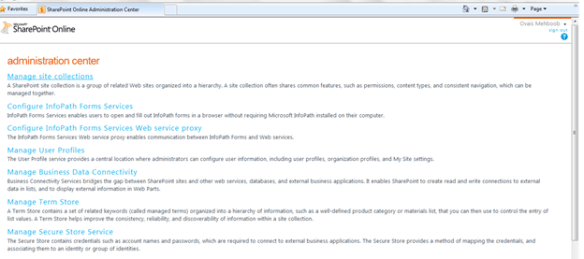
  1. In the SharePoint online page click on Manage Site Collections
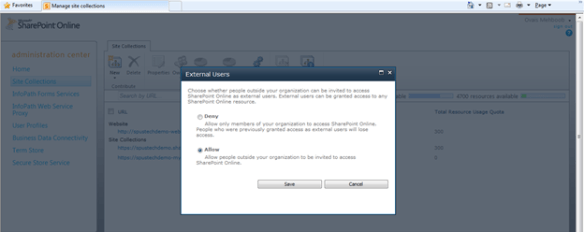
  2. Click on Setting-> Manage external settings

  1. Click Allow

Login to Site Collection

  1. Go to the Site settings of Parent site (mainly Public site as most of the sites derived from there) and click on Manage Site Collection feature.
  2. Activate External Users Invitations feature.
  3. Now you can invite multiple users to particular site and grant permission on particular item.

Inviting Users and Granting Permissions

  1. Once you are logged in to you site collection you can share particular site from Site Actions -> Share Site option.

    Here I want to share my Team site with external users and wants to grant permission on particular wiki page.

  2. Once you click on the Share site option, you have to provide its user id. Note: please provide office 365 account id or Hotmail id as when the user tries to login there will be only two options provided either to login through Hotmail account or Office 365 Online account.

  3. User will get a notification in email and when he accepts that a new user will be created in the specified groups. Now the admin can grant permissions to external users for particular site item or page.

  1. Below screens shows the external user logged in to the site with his Hotmail id and have contributing permission on only particular wiki page.

Rate this:

Share this:

  • Share
  • Click to print (Opens in new window) Print
  • Click to email a link to a friend (Opens in new window) Email
  • Tweet
Like Loading...
Posted in All Technical Articles, SharePoint | Tagged External Account, SharePoint | 91 Replies

Recent Tweets

Tweets by ovaismehboob

Archives

  • December 2023 (1)
  • May 2021 (1)
  • July 2019 (1)
  • June 2019 (1)
  • October 2018 (1)
  • May 2018 (1)
  • January 2018 (1)
  • May 2017 (1)
  • March 2017 (2)
  • December 2016 (1)
  • August 2016 (1)
  • July 2016 (1)
  • January 2016 (1)
  • December 2015 (2)
  • November 2015 (1)
  • August 2015 (1)
  • July 2015 (1)
  • May 2015 (1)
  • April 2015 (1)
  • February 2015 (2)
  • December 2014 (3)
  • November 2014 (1)
  • October 2014 (1)
  • September 2014 (1)
  • August 2014 (2)
  • July 2014 (4)
  • June 2014 (2)
  • May 2014 (1)
  • April 2014 (2)
  • March 2014 (2)
  • February 2014 (2)
  • January 2014 (2)
  • November 2013 (2)
  • October 2013 (2)
  • July 2013 (1)
  • June 2013 (1)
  • May 2013 (1)
  • March 2013 (1)
  • December 2012 (1)
  • November 2012 (2)
  • October 2012 (5)
  • September 2012 (1)
  • March 2012 (1)
  • February 2012 (1)
  • January 2012 (1)
  • December 2011 (1)
  • November 2011 (1)
  • October 2011 (1)
  • September 2011 (2)
  • July 2011 (6)
  • June 2011 (4)
  • May 2011 (1)
  • January 2011 (1)
  • December 2010 (1)
  • November 2010 (1)

Blog Stats

  • 183,941 hits

Tags

  • .Net
  • ASP.Net
  • ASP.Net AJAX
  • C#
  • Code first
  • dailyprompt
  • dailyprompt-2169
  • Debugging
  • Delegates
  • Duplex Messaging
  • DZone MVB
  • Entity Framework
  • Events
  • External Account
  • IIS Express
  • Microsoft Technology Practices User Group
  • Most Valuable Blogger
  • OData
  • Open Data Protocol
  • Ovais Mehboob
  • Repository pattern
  • SharePoint
  • UG
  • User Controls
  • VIsual Studio
  • WCF
  • Windows Forms
  • Windows Services

Connect @

  • View ovaismehboob’s profile on Facebook
  • View ovaismehboob’s profile on Twitter
  • View ovaismehboob’s profile on LinkedIn

Top Posts

  • WPF Data Binding Options

Goodreads

  • Subscribe Subscribed
    • Ovais TechBlogs
    • Join 41 other subscribers
    • Already have a WordPress.com account? Log in now.
    • Ovais TechBlogs
    • Subscribe Subscribed
    • Sign up
    • Log in
    • Report this content
    • View site in Reader
    • Manage subscriptions
    • Collapse this bar
%d