Production deployment Issues when ASP.Net Web Application access COM+ component

Earlier last month we developed one project in which we had to use Office Excel COM+ component to save documents into .mht formats after manipulating them which finally displays on the browser window. It was the web application and everything was running fine at the development machine.

SYMPTOMS

The project got approved and when we deployed on the production server we came across several exceptions pertaining of accessing Office COM component on server.

Event ID: 10016

Event Source: DCOM

Description: The application permission settings do not grant Local Launch permission for the COM Server application This security permission can be modified using the Component Services administrative tool.

CAUSE

User does not have required permission to start COM component.

RESOLUTION

I tried searching on google and then find this useful link which solves my problem i.e. http://support.microsoft.com/kb/899965

Below steps taken from the above URL

Grant the user permissions to start the COM component

Grant the user permissions to start the COM component. To do this, follow these steps:

  • Click Start, click Run, type regedit in the Open box, and then click OK.
  • Locate and then click the following registry subkey:

    HKEY_CLASSES_ROOT\CLSID\CLSID value

    Note In this subkey, “CLSID value” is a placeholder for the CLSID information that appears in the message.

  • In the right pane, double-click AppID.

    The Edit String dialog box appears. Leave this dialog box open and continue to the next step.

  • Click Start, click Run, type dcomcnfg in the Open box, and then click OK.

    If a Windows Security Alert message prompts you to keep blocking the Microsoft Management Console program, click to unblock the program.

  • In Component Services, double-click Component Services, double-click Computers, double-click My Computer, and then click DCOM Config.
  • In the details pane, locate the program by using the friendly name.

    If the AppGUID identifier is listed instead of the friendly name, locate the program by using this identifier.

  • Right-click the program, and then click Properties.
  • Click the Security tab.
  • In the Launch and Activation Permissions area, click Customize, and then click Edit.
  • Click Add, type the user’s account name, and then click OK.
  • While the user is selected, click to select the Allow check boxes for the following items:
    • Local Launch
    • Remote Launch
    • Local Activation
    • Remote Activation
  • Click OK two times.
  • Quit Registry Editor.

Grant the correct permissions to the Network Service account

To grant the correct permissions to the Network Service account, follow these steps:

  • Click Start, click Run, type dcomcnfg in the Open box, and then click OK.
  • In Component Services, double-click Component Services, and then double-click Computers.
  • Right-click My Computer, and then click Properties.
  • Click the COM Security tab.
  • In the Launch and Activation Permissions area, click Edit Default.
  • Click Add, type Network Service, and then click OK.
  • While Network Service is selected, click to select the Allow check boxes for the following items:
    • Local Launch
    • Remote Launch
    • Local Activation
    • Remote Activation

    Click OK two times.

After this, I tested the application deployed on production and it works. Few days later client reported that I am unable to view documents on my browser and sometimes it work sometimes not. She was using IE 10. Initially I was thinking that maybe it’s due to IE 10 as the application is running smoothly at my end and I had IE 9. But later on when I debugged the error I came to know that it’s again related to some security permissions of COM component.

Exception:
Sys.WebForms.PageRequestManagerServerErrorException: Retrieving the COM class factory for component with CLSID {00024500-0000-0000-C000-000000000046} failed due to the following error: 8000401a The server process could not be started because the configured identity is incorrect. Check the username and password. (Exception from HRESULT: 0x8000401A).

After doing some search, I found the resolution which fixed my problem. Following are the symptoms, cause and resolution taken from http://support.microsoft.com/kb/305761

SYMPTOMS

This error occurs when no user is interactively login to the server and if you start COM+ from remote client or terminal the application fails.

Actually I used to connect to my server hosted in US through VPN connection. And the reason it worked sometimes was that I already logged in interactively to the server. And when I’m not, client faced error.

CAUSE

This problem occurs because the default identity is set as Interactive user.

RESOLUTION

In order to resolve this problem I changed the Excel Application identity account from Interactive to local Administrator account.

Steps

  1. Open Component Services
  2. Select COM+ component (in my case it was Excel Application) and click Properties
  3. Go to Identity tab
  4. Select Custom Account
    1. Specify Username and password that have permissions to start the COM+ component.

Hence, this solved my problem.


Bridging data between ASP.Net and Silverlight

A task comes up to me in which I have to develop a private chat application for some product. I did some research on the XMPP protocol used by Facebook, Google etc. XMPP is a powerful protocol for public chat applications where thousands of users connect with each other. It has a separate XMPP server which listens to request and respond on it. There are also bunch of free XMPP servers available in the market.

Our goal is to provide a private chat where mid amount of users coordinate with particular resources time to time and the message format is not just simple like normal chat applications. We need to pass some advanced set of information to the recipient depending on which chat mode he has chosen. Then I chose WCF Duplex messaging where I can put all the business logic and intercept messages easily.

In order to make a chat application just like Facebook which have panel on the right and load chat popups that remains on the page I have to used Silverlight and ASP.Net and provide a special bridging between them. The reason of using Silverlight is that the ASP.Net doesn’t work with WCF Duplex Messaging because the framework of ASP.Net is request/response, whereas the Silverlight client is downloaded at client side and on each connection with WCF Service, service can send data back to client using default port 80.

I will not share how WCF Duplex messaging works, as I already published one article before on that but I will highlight the scenarios that can be implemented using very easy and simple code snippet provided to accomplish a bridging between ASP.Net and Silverlight.

Calling JavaScript function from Silverlight

string username = “Ovais”;

HtmlPage.Window.Invoke(“JSFunction”, username);


JSFunction is the javascript function implemented on the page where the Silverlight control is hosted. You can also pass the complete class object using Invoke method but that class object should be annotated by [ScriptableType()]attribute

[ScriptableType()]

public
class
ChatInfo

{

public
string UserName { get; set; }

public
int UserType {get; set; }

}


ChatInfo cInfo = new
ChatInfo() { UserName = “Ovais”, UserType = 1 };

HtmlPage.Window.Invoke(“JSFunction”, cInfo);


Getting Data in Silverlight from ASP.Net

In Silverlight you can read the HTML DOM using HTMLPage.Document object

HtmlPage.Document.GetElementById(“hiddenField1”).GetAttribute(“value”).ToString();


Using above two scenarios I succeeded passing data between both.


Happy coding!


Reviewed Book “Object-Oriented Thought Process – by Matt Weisfeld”


Being an MVB (Most Valuable Blogger) at DZone, I have gotten an opportunity to review a book named “Object-Oriented Thought Process – Fourth Edition”, written by Matt Weisfeld.

Following is a review I made for this book,

“A great book to learn the Object oriented principles and start thinking in object terms. Matt has provided the real life examples which help reader to understand the concept of object oriented principles easily. He started from the basic concepts and ended up with more advanced concepts like Object persistence and design patterns that helps reader to gain knowledge on the vital areas as well when designing or else working on any project.  Although there are many code snippets provided to discourse any topic but there is no single programming language used to express code, this is a valuable effort to provide code snippets in different languages but the convention is not consistent. It can be improved by providing code extracts for other languages as well while addressing any topic with some special formatting that helps reader to understand code in preferred language.”

Enabling Lazy Loading in Entity Framework Code First Model

In Entity Framework you can configure several attributes for your Database Context class. In this article I will tell you what Is Lazy Loading and how you can leverage this feature in Code First Model.

Lazy Loading is a feature through which the Code First engine loads the navigation objects that belongs to the parent entity. For e.g. If there is a Person Entity and Person belongs to particular Department. Now when you load the Person retrieve the person object it will load the Department object values as well through which you can easily navigate to its properties and display those on forms or anywhere.

In order to enable Lazy Loading you can enable the properties values under your context constructor as follows.


public DemoContext()

{


this.Configuration.LazyLoadingEnabled = true;


this.Configuration.ProxyCreationEnabled = true;

}


One important point, lazy loading will only work if the ProxyCreationEnabled is enabled and the Navigation property of entity is virtual.


public
class
Person

{


public
Int32 Id { set; get; }


public
String Name { set; get; }


public
virtual
Department Department { get; set; }


public
Int32 DepartmentId { set; get; }


public
string Gender { set; get; }

}


public
class
Department

{


public
Int32 Id { set; get; }


public
String DepartmentName { set; get; }


public
virtual
ICollection<Person> Persons { set; get; }

}


Now, let suppose person table and department table have few records stored. When you read the Person using context.ToList () or any other linq function it will automatically load the department objects as well.

Develop a function that returns the list.

public
Person GetPerson(int id)

{


DemoContext context = new
DemoContext();

{


var items = context.Persons.Where(i => i.Id == 1);


return items;

}

}


Now, by adding a watch on Items you can see that you will get corresponding Department values i.e. DepartmentName and Id as well.


Therefore, Lazy loading helps developer to retrieve the child objects rather making joins in Linq query and automatically do the join part.

Happy Coding!

Enabling Transactions in WCF

Transaction plays an important role in any business application that involved CRUD operations. To implement transactions, we utilize TransactionScope class that automatically manages transactions and detect the scope of the transaction. You can apply TransactionScope on a block of code and regardless of how many WCF services instances you have opened or operation contracts you are calling will be carried on the scope of that transaction. For example, if you are calling three services methods and third one fails to complete the operation, transaction will be rolled back unless it’s outside the boundary of a TransactionScope.

WCF supports transaction on following bindings.

  1. WSHttpBinding
  2. NetTcpBinding
  3. NetNamedPipeBinding
  4. WSDualHttpBinding
  5. WSFederationHttpBinding

While developing a Service Contract you have to specify the TransactionFlow attribute on each Operation Contracts that requires a Transaction to be handled. In the below code snippet there are two methods one which submit employee master information and the other that submits employee details. As both require transaction so I have specified TransactionFlow attribute on both of them.

[OperationContract]

[TransactionFlow(TransactionFlowOption.Allowed)]


void CreateEmployee(Common.DataContracts.Employee employee);

[OperationContract]

[TransactionFlow(TransactionFlowOption.Allowed)]


void SubmitEmployeeDetails(EmployeeDetails employeeDetails);

There are following flow options in the TransactionFlow attribute.

TransactionFlowOption. Allowed : Transaction can be flowed.

TransactionFlowOption.Mandatory : Transaction must be flowed.

TransactionFlowOption.NotAllowed : Transaction should not be flowed. This is default.

Next, implement the service and specify OperationBehavior attribute on each method. You can specify the TransactionScopeRequired property as true or false.

[OperationBehavior(TransactionScopeRequired= true)]

public void CreateEmployee(Common.DataContracts.Employee employee){

}

Now enable the Transaction on the binding itself. Open your web.config file and specify the transactionflow = true as follows

<wsHttpBinding>

<binding
name=TransactionalBind
transactionFlow=true/> </wsHttpBinding>

Now add service reference and consume the service. While calling CreateEmployee and SubmitEmployeeDetails method you have to put them in the TransactionScope block and if any of the method fails, the transaction will be rollback.

using (TransactionScope scope = new
TransactionScope())

{

try

{

Services.EmployeeService.EmployeeServiceClient()

clientobj = new Services.EmployeeService.EmployeeServiceClient();

clientobj.CreateEmployee(employeeObj);

clientobj.SubmitEmployeeDetails(employeeObjDetails);

scope.Complete();

}

catch (Exception ex)

{

scope.Dispose();

}

}

Happy programming!

Basic Introduction about T4 Templates & How to customize them for ASP.NET MVC Project

In ASP.Net MVC 3 you can easily generate views from predefined scaffolding templates provided for Create, Edit, List, Delete and Details views out of the box which seems quite riveting. Actually, there are some *.tt template files (known as T4 templates) stored at following path C:\Program Files\Microsoft Visual Studio 10.0\Common7\IDE\ItemTemplates\CSharp\Web that contains the basic structure and page layout for these views and based on those templates it generates the Create, Edit, Delete, List, Details and Empty .cshtml or .aspx files depends on which project language you have chosen for ASP.Net MVC project.

In this post I will discuss about T4 templates and how we can customize by taking a simple example.

What is T4

T4 stands for Text Template Transformation Toolkit. T4 generates text based on Text based template files, Template is a combination of text and control logic that you can define using C# or VB.net. Transformation actually executes the code written in template and brings out a final output whereas the Toolkit contains some assemblies leverage to produce the desire output file.

Now, let’s quickly open the sample Create.tt file to see what it looks like and how we can customize. When you open the file you can see directives

<#@ template language=”C#” HostSpecific=”True” #>

<#@ output extension=”.cshtml” #>

language specifies which language we are using either C# or VB.net and HostSpecific =”True” used only with custom hosts. If you set the value of parameter to true, you can access a property called Host in your text template. The property is a reference to the object that hosts the engine. At last, the output extension tells the extension in which the new file this will be generated.

T4 contains 4 types of blocks

  • Expression block

    Used as <#= expression #>, we can write C# or VB.net code but don’t use semi-colon at the end of statement

  • Statement block

    Used as <# code…. #>, define any C# or VB.net code and initialize variables, define loops etc. Here we have to specify semi-colon at the end of the code statement just like as we program in a class file.

  • Class feature block

    Used as <#+ code… #>, define methods, classes, properties and constants and can we called from anywhere within the template file. For example, we can create a function that perform some calculation based on the parameters passed and return a Boolean through which we can handle the UI designing.

Below is the actual page content that dynamically generates the page based on the model attached to it.

@using (Html.BeginForm()) {

@Html.ValidationSummary(true)

<fieldset>

<legend><#= mvcHost.ViewDataType.Name #></legend>

<#

foreach (ModelProperty property in GetModelProperties(mvcHost.ViewDataType)) {

if (!property.IsPrimaryKey && !property.IsReadOnly && property.Scaffold) {

#>

<div class=”editor-label”>

<#

if (property.IsForeignKey) {

#>

@Html.LabelFor(model => model.<#= property.Name #>, “<#= property.AssociationName #>”)

<#

} else {

#>

@Html.LabelFor(model => model.<#= property.Name #>)

<#

}

#>

</div>

<div class=”editor-field”>

<#

if (property.IsForeignKey) {

#>

@Html.DropDownList(“<#= property.Name #>”, String.Empty)

<#

} else {

#>

@Html.EditorFor(model => model.<#= property.Name #>)

<#

}

#>

@Html.ValidationMessageFor(model => model.<#= property.Name #>)

</div>

<#

}

}

#>

<p>

<input type=”submit” value=”Create” />

</p>

</fieldset>

}

<div>

@Html.ActionLink(“Back to List of Main Page”, “Index”)

</div>

In the above mentioned code there is if statement that checks whether the property is a foreign key or not and based on that it generates a drop down code otherwise an input control.

Let’s create a sample application in ASP.Net MVC 3 and check it out by customizing a Create T4 template.

  1. Create a sample project in ASP.Net MVC3 in Visual Studio.
  2. Create a model class for Person and Designation. Person record contains some basic information and Designation holds the list of designations. Below is the Code First model Approach using Entity Framework ver. 4.3.1.


    public
    class
    Person    

    {


    public
    long PersonId { set; get; }


    public
    String FirstName { set; get; }


    public
    String LastName { set; get; }


    public
    String EmailAddress { set; get; }


    public
    String Phone { set; get; }


    public
    long DesignationId { set; get; }


    public
    virtual
    Designation Designation { set; get; }

    }


    public
    class
    Designation

    {


    public
    long DesignationId { set; get; }


    public
    String DesignationName { set; get; }


    public
    virtual
    ICollection<Person> Persons { get; set; }

    }

  3. Create a DBContext class and define DBSet for these entities.

public
class
DBContext : System.Data.Entity.DbContext, IDisposable

{


public
DbSet<Person> Persons { get; set; }


public
DbSet<Designation> Designations { set; get; }

}

  1. Now create a Person controller selecting Controller with read/write actions and select Person as a Model class and DB Context as you Database Context class.

  1. Now if you open the Create.cshtml file you will see a drop down list for designation. As in the template file there was a foreign key check. If you run the application form will be shown as below.

  1. Now let’s change a drop down to list box in the Create.tt file.

    <div class=”editor-field”>

    <#

    if (property.IsForeignKey) {

    #>


    @Html.ListBox(“<#= property.Name #>”)

    <#

    } else {

    #>

    Is not a foreign key baba: <#= property.IsForeignKey #> : @Html.EditorFor(model => model.<#= property.Name #>)

    <#

    }

    #>

    @Html.ValidationMessageFor(model => model.<#= property.Name #>)

    </div>

  1. Delete the previous controller and generate it again. It will generate a ListBox as specified in a tt file.

This was the simple example showing how developers can modify existing templates based on their needs and reduce development time. Hope this helps!

Using Enterprise Library Validation Application Block in WCF

Validation plays an important role in any messaging communication between distributed systems and especially when you are designing a SOA where the service is consumed by many third party consumers.

In this post I will show how to leverage the Enterprise Library Validation Application Block to apply validation on WCF Service contracts that really makes the task very easy for the developers to apply validations.

Develop Service
I will create a simple project that shows how one can apply validation on Service contracts in WCF.

  1. First of all create a Simple WCF Service Application Project in Visual Studio
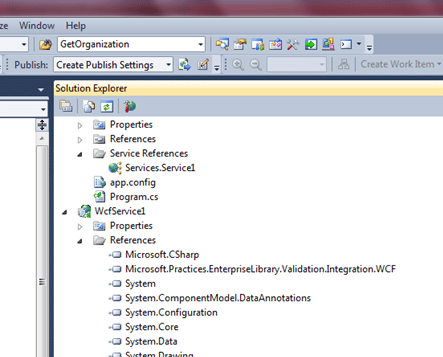
  2. Add a reference to Microsoft.Practices.EnterpriseLibrary.Validation.Integration.WCF assembly.

  3. Open the Service Interface (by default it generated IService) and apply the class level attribute “ValidationBehavior” on service’s interface. ValidationBehavior is Validation Application Block Service Behavior and is responsible to validate requests. Now you need to apply the FaultContract and specify the type of data that holds the information about the error.

            FaultContract is used to communicate error from service to client.
     [ServiceContract]

     [ValidationBehavior]
     public interface IService1

 {
   [OperationContract]

   [FaultContract(typeof(ValidationFault))]
   string Execute(Name value);
 }
In the above code you can see there is a Name class object passed as a parameter in Execute    function.

     4.  Now implement the Service Contract interface in HelloWorldService class.

    public class HelloWorldService :IService1{
      public string Execute(Name name){
        return string.Format(“your name is {0} {1}”, name.FirstName, name.LastName);
      }
    }

5. This Name class is the Service’s DataContract. Below is the code snippet for Name class

    [DataContract]
    public class Name {
      [StringLength(25, MinimumLength=1, ErrorMessage=“First Name length is not correct”)]
      [DataMember]
      public String FirstName{ set; get; }

      [StringLength(25, MinimumLength = 1, ErrorMessage = “Last Name length is not correct”)]
      [DataMember]
public string LastName { set; get; }

}
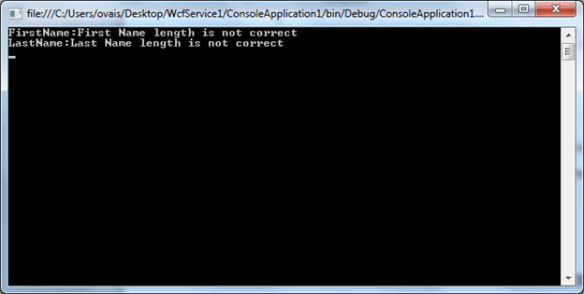
In the above code, I have specified two properties of String type and applied Data Annotations attribute for String length validation. You can apply as many validations as you want.

Consume Service

6. Create a sample console project in Visual Studio to test.

7. Add a service reference by clicking on the Service References in Visual Studio.

8. Initialize service instance

9. Call Execute function and pass invalid string values.

   static void Main(string[] args) {
      var name = new Name { FirstName = “”, LastName = “” };
      var client = new ConsoleApplication1.Services.Service1.Service1Client();
      try{ Console.WriteLine(client.SayHello(name)); }
catch (FaultException<ValidationFault> fault)
      {
         foreach (var detail in fault.Detail.Details)
{
               Console.WriteLine(“{0}:{1}”, detail.Key, detail.Message); }
      }
      client.Close();
      Console.ReadLine();
    }

10. In the above code I have passed Name object with empty string values to test whether the service is validating or not and here is the result.

Develop and Consume OData Web Services in WCF

What is OData?

OData is an Open Data Protocol used to access data from various sources like Relational databases, file systems, etc. and exposes it to the consumers that can query or update data. OData is based upon Web technologies such as HTTP, Atom Publishing Protocol (AtomPub) and JSON to provide access to information from variety of data sources. Consumers can query the data using HTTP protocol and get the results in AtomPub and JSON formats. These are the formats through which the service can deliver the requested resources or collection of entities.

OData is released under the Open Specification Promise http://www.microsoft.com/openspecifications/en/us/programs/osp/default.aspx and anyone can freely interoperate with OData implementations.

Developing WCF Service using OData Protocol

Microsoft has first introduced OData support in Visual Studio 2008 SP1 in terms of ADO.Net Data Services (subsequently known as WCF Data Services). Developers can create services on the fly and exposes data using Entity Framework or LINQ 2 SQL ORM tools.

Let’s create a simple WCF Data Service and expose data using Entity Framework.

  1. Start Visual Studio 2010 and create a new WCF Service Application project.


  1. Right click the WCF Service Application project and click on the “Add New Item”, then select WCF Data Service.


  2. If you open the WCF Data Service class file you can see the Class will be derived from the generic DataService class. This is the main entry point for developing WCF Data services. We have to specify the data source class name. In order to proceed further I will add entity framework model which creates the entities model on the fly.
  3. Right click on the Service Project and Add “ADO.Net Entity Data Model” from the dialog.


    When you add ADO.Net Entity Model it will ask you to select the data source, go through the wizard by selecting the data source and finish a dialog.

  4. Now open the .edmx file click on properties.


    Here’s the entity container named as “DDMSEntities”. Just specify the name DDMSEntities in your WCF Data Service base class like below

public class WcfDataService1 : DataService<DDMSEntities>

  1. You can now add the SetEntitySetAccessRule for each entity you want to expose. Default configuration is to deny access to resources. When a service is initialized the access rights must be enabled.

    Sample code snippet below


public static void InitializeService(DataServiceConfiguration config)
{

// TODO: set rules to indicate which entity sets and service operations are visible, updatable, etc.

config.DataServiceBehavior.MaxProtocolVersion = DataServiceProtocolVersion.V2;

config.SetEntitySetAccessRule (“Levels”, EntitySetRights.AllRead);

config.SetEntitySetAccessRule (“NodeTypes”, EntitySetRights.All);

}

In Above code, I have added two tables i.e. Levels and NodeTypes and given permissions as AllRead. There are many permission levels you can set as follows. Below are the enums of EntitySetRights with their description

  • All – Authorize to create, read, update and delete data.
  • AllRead- Authorize to read data.
  • AllWrite- Authorize to write data.
  • None- Denies all rights to access data.
  • ReadMultiple – Authorize to read sets of data.
  • ReadSingle – Authorize to read single data of items.
  • WriteAppend- Authorize to create new data items in the data sets.
  • WriteDelete –Authorize to delete data items from the data sets.
  • WriteMerge – Authorize to merge data.
  • WriteReplace – Authorize to replace data.
  1. Now let’s build a service and test it. Once you hit the web service in a browser, you will see the page as below


    The above feed representing the data as per Atom Syndication format. There are two entity collections namely “Levels” and “NodeTypes”.

                                      http://localhost:32555/WcfDataService1.svc/Levels?filter= LevelTree gt

                                     “gt” is used for greater than where as “lt” is used for less than.

Consuming WCF Data Service in Web Application

  1. Create a new Web Application project in Visual Studio
  2. Add a service reference by right clicking on Add Service Reference and select the newly service created.


  3. Add a button to call the service on its click event.
  4. On the click event you can consume the service like below

Services.DMSEntities.DDMSEntities entities = new Services.DMSEntities.DDMSEntities(new
Uri(http://localhost:32555/WcfDataService1.svc&#8221;));

var lst = entities.Levels.FirstOrDefault();

This will return the first item in the collection. You can execute all CRUD operations depending on the rule set in the Service for that entity.

Hope this helps, happy coding!

Problem loading ASP.Net project after installing VS 2010 SP1

Sometimes developer faces this problem on loading existing web projects that were hosted on local IIS server and using the same port number that has been used by the IIS Express for particular websites. IIS Express installed by default when you apply the SP1 for Visual Studio 2010.

In my case, I installed VS 2010 SP1 to install Silverlight 5 Tools for VS 2010 and when opened my existing web project which was earlier hosted on my Local IIS server using the same port no i.e. 8080, came across this error.

In order to rectify, the simplest way is to change the port no in the applicationhost.config file placed under [Win_Drive]:\Users\[User]\Documents\IISExpress\config folder. When open the applicationhost.config file you will find the <bindings> tag under <site> tag followed with the port no.

Change the port no and don’t forget to save the file. Now try reloading the project and it opens without any issue.

Implementing Repository Pattern with Entity Framework – Code First Model Approach

When working with Entity Framework – Code First model approach, developer creates POCO entities for Database tables. The benefit of using Code First model is to have POCO entity for each table that can be used as either WCF Data Contracts or you can apply your own custom attributes to handle Security, Logging, etc. and there is no mapping needed as we used to do in Entity Framework (Model First) approach if the application architecture is n-tier based.

Considering the Data Access layer, we will implement a repository pattern that encapsulates the persistence logic in a separate class. This class will be responsible to perform database operations. Let’s suppose the application is based on n-tier architecture and having 3 tiers namely Presentation, Business and Data Access. Common library contains all our POCO entities that will be used by all the layers.

Presentation Layer: Contains Views, Forms

Business Layer: Managers that handle logic functionality

Data Access Layer: Contains Repository class that handles CRUD operations

Common Library: Contain POCO entities.

We will implement an interface named “IRepository” that defines the signature of all the appropriate generic methods needed to perform CRUD operation and then implement the Repository class that defines the actual implementation of each method. We can also instantiate Repository object using Dependency Injection or apply Factory pattern.

Code Snippet: IRepository


public
interface
IRepository : IDisposable

{


///
<summary>


/// Gets all objects from database


///
</summary>


///
<returns></returns>


IQueryable<T> All<T>() where T : class;


///
<summary>


/// Gets objects from database by filter.


///
</summary>


///
<param name=”predicate”>Specified a filter</param>


///
<returns></returns>


IQueryable<T> Filter<T>(Expression<Func<T, bool>> predicate) where T : class;


///
<summary>


/// Gets objects from database with filting and paging.


///
</summary>


///
<typeparam name=”Key”>


///
<param name=”filter”>Specified a filter</param>


///
<param name=”total”>Returns the total records count of the filter.</param>


///
<param name=”index”>Specified the page index.</param>


///
<param name=”size”>Specified the page size</param>


///
<returns></returns>


IQueryable<T> Filter<T>(Expression<Func<T, bool>> filter, out
int total, int index = 0, int size = 50) where T : class;


///
<summary>


/// Gets the object(s) is exists in database by specified filter.


///
</summary>


///
<param name=”predicate”>Specified the filter expression</param>


///
<returns></returns>


bool Contains<T>(Expression<Func<T, bool>> predicate) where T : class;


///
<summary>


/// Find object by keys.


///
</summary>


///
<param name=”keys”>Specified the search keys.</param>


///
<returns></returns>

T Find<T>(params
object[] keys) where T : class;


///
<summary>


/// Find object by specified expression.


///
</summary>


///
<param name=”predicate”></param>


///
<returns></returns>

T Find<T>(Expression<Func<T, bool>> predicate) where T : class;


///
<summary>


/// Create a new object to database.


///
</summary>


///
<param name=”t”>Specified a new object to create.</param>


///
<returns></returns>

T Create<T>(T t) where T : class;


///
<summary>


/// Delete the object from database.


///
</summary>


///
<param name=”t”>Specified a existing object to delete.</param>


int Delete<T>(T t) where T : class;


///
<summary>


/// Delete objects from database by specified filter expression.


///
</summary>


///
<param name=”predicate”></param>


///
<returns></returns>


int Delete<T>(Expression<Func<T, bool>> predicate) where T : class;


///
<summary>


/// Update object changes and save to database.


///
</summary>


///
<param name=”t”>Specified the object to save.</param>


///
<returns></returns>


int Update<T>(T t) where T : class;


///
<summary>


/// Select Single Item by specified expression.


///
</summary>


///
<typeparam name=”T”></typeparam>


///
<param name=”expression”></param>


///
<returns></returns>

T Single<T>(Expression<Func<T, bool>> expression) where T : class;


void SaveChanges();


void ExecuteProcedure(String procedureCommand, params
SqlParameter[] sqlParams);

}

Code Snippet: Repository

public
class
Repository : IRepository

{


DbContext Context;


public Repository()

{

Context = new
DBContext();

}


public Repository(DBContext context)

{

Context = context;

}


public
void CommitChanges()

{

 Context.SaveChanges();

}


public T Single<T>(Expression<Func<T, bool>> expression) where T : class

{


return All().FirstOrDefault(expression);

}


public
IQueryable<T> All<T>() where T : class

{


return Context.Set().AsQueryable();

}


public
virtual
IQueryable<T> Filter<T>(Expression<Func<T, bool>> predicate) where T : class

{


return Context.Set<T>().Where<T>(predicate).AsQueryable<T>();

}


public
virtual
IQueryable<T> Filter<T>(Expression<Func<T, bool>> filter, out
int total, int index = 0, int size = 50) where T : class

{


int skipCount = index * size;


var _resetSet = filter != null ? Context.Set().Where(filter).AsQueryable() : Context.Set().AsQueryable();

 _resetSet = skipCount == 0 ? _resetSet.Take(size) : _resetSet.Skip(skipCount).Take(size);

total = _resetSet.Count();


return _resetSet.AsQueryable();

}


public
virtual T Create(T TObject) where T : class

{


var newEntry = Context.Set().Add(TObject);

Context.SaveChanges();


return newEntry;

}


public
virtual
int Delete(T TObject) where T : class

{

 Context.Set().Remove(TObject);


return Context.SaveChanges();

}


public
virtual
int Update(T TObject) where T : class

{


try

{


var entry = Context.Entry(TObject);

 Context.Set().Attach(TObject);

entry.State = EntityState.Modified;


return Context.SaveChanges();

}


catch (OptimisticConcurrencyException ex)

{


throw ex;

}

}


public
virtual
int Delete<T>(Expression<Func<T, bool>> predicate) where T : class

{


var objects = Filter<T>(predicate);


foreach (var obj in objects)

Context.Set<T>().Remove(obj);


return Context.SaveChanges();

}


public
bool Contains<T>(Expression<Func<T, bool>> predicate) where T : class

{


return Context.Set<T>().Count<T>(predicate) > 0;

}


public
virtual T Find<T>(params
object[] keys) where T : class

{


return (T)Context.Set<T>().Find(keys);

}


public
virtual T Find<T>(Expression<Func<T, bool>> predicate) where T : class

{


return Context.Set<T>().FirstOrDefault<T>(predicate);

}


public
virtual
void ExecuteProcedure(String procedureCommand, params
SqlParameter[] sqlParams){

 Context.Database.ExecuteSqlCommand(procedureCommand, sqlParams);

}


public
virtual
void SaveChanges()

{

Context.SaveChanges();

}


public
void Dispose()

{


if (Context != null)

Context.Dispose();

}

}

The benefit of using Repository pattern is that all the database operations will be managed centrally and in future if you want to change the underlying database connector you can add another Repository class and defines its own implementation or change the existing one.